
Google recently released a version of Google Talk for iPhone and iPod browsers. To use Google Talk, point safari browser on iPhone or iPod to www.google.com/talk.
Google recently released a version of Google Talk for iPhone and iPod browsers. To use Google Talk, point safari browser on iPhone or iPod to www.google.com/talk.
The love between Yahoo and Google has grown beyond the search deal and now they are connecting their Instant Messengers. In a press release statement both the companies "agreed to enable interoperability between their respective instant-messaging services, bringing easier and broader communication to users". This means that you can chat with Google Talk friends from Yahoo Messenger and vice-versa.
Already Yahoo & Microsoft enabled interoperability between their messengers that allows Yahoo users to chat with Live Messenger users and vice-versa. Similarly Google Talk and AIM users can talk to each other.
So if you have more friends in Yahoo, Live & Google Talk Messenger then Yahoo is the best messenger to stay connected. If you have more friends in AIM, Yahoo and Google Talk messengers then Google Talk is be the best messenger to stay connected.
This is a good move towards interoperability of Instant Messengers.
By the way is your work place or university blocked the Instant Messenger access? Here is an excellent from Tech Dreams to unblock and access the messengers.
Thanks Amit
 The latest versions of Yahoo & Microsoft MSN Messenger are installed with the help of online installer applications.
An online installer application is a small file which is downloaded first; it will then launch, download the required program from servers and begin installation automatically. This means that the computer on which you are trying to install Yahoo/MSN Messenger should be connected to Internet.
It is not only Yahoo & Microsoft but also other software giants like Google & Adobe are making the assumption that users are connected to Internet while installing software.
The online installation has many benefits like automatically detecting the parameters of the computer and downloading the required binaries for installation. But what about the computers that does not have access to Internet? How do we Install Yahoo Messenger and MSN Messenger?
Here are the direct links to bypass online/web installers of Yahoo & MSN Messengers and download the offline installers
Links to Download Yahoo Messenger Offline Installer
Download Windows Vista Version
Trick to download MSN Messenger Offline Installer
There is no direct link to download MSN Messenger offline installer but we can backup the installer from web installer. Follow these steps to take a back of MSN offline installer
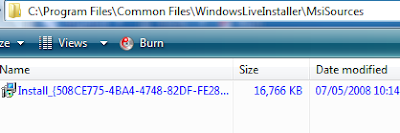
Thanks Ashish Saini & Raymond
Google has integrated their translation tools into Google Talk application through chat bots. These chat bots can translate text of one language to another language and works as your personal language translation assistants.
For instance, to have a line translated from English to French, invite en2fr@bot.talk.google.com to chat and then simply chat the line you want to see translated. Here are the few lines of chat conversation which I had with the bot to get English sentences translated to French.
The translation bots use Google Translate as their back end and this feature comes very handy when you want to chat with someone in their native language.
According to Google there are 24 bots currently available: ar2en, de2en, de2fr, el2en, en2ar, en2de, en2el, en2es, en2fr, en2it, en2ja, en2ko, en2nl, en2ru, en2zh, es2en, fr2de, fr2en, it2en, ja2en, ko2en, nl2en, ru2en, zh2en.
While machine translation is not perfect, these bots can be helpful in bridging the language barriers but advised not to use for official communication.
Google has given us an early Christmas present by linking Reader with Google Talk.Now all your shared items will be visible to your friends from Google Talk, and vice versa.
If Google would just start tracking the popularity of shared items and applied them in aggregate to compile a most shared feed, they'd have their Digg Killer in hand. It's that simple now.


Finally Yahoo released a messenger version for vista with a beautiful interface that utilized the new Aero features in Windows Vista.This application came just over a month after the release of new Yahoo Messenger for Windows version 9.0.
This version of messenger for vista also added the most useful features like tabbed windows, that was totally missed in version 9.0.
It has also been fully skinned for Vista and integrates into that operating system’s gadget bar. Other features include the ability to change layout of our contact list and automatic filtering of contacts as you enter search terms.
Google rolled out another nice feature in GMail 2.0 to allow you chat with AOL Instant Messenger contacts. The new AOL Messenger support lets you to log into AOL account to chat with your AIM buddies right inside GMail.
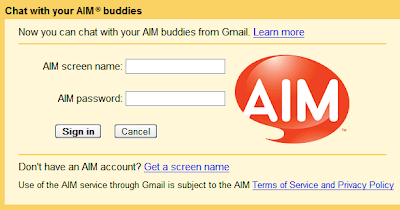
You can log in to AIM through Gmail by selecting the option Sign into AIM available in the chat status menu as well as chat settings page.
When you log into AIM through Gmail all your AIM buddies will appear in the chat list along with the Google talk buddies. The chat conversation with your AIM buddies is stored in chat history similar to Google Talk chat history.
This features seems to be available in GMail but not in Google Talk desktop client or Google Talk web gadget. Also note that Gmail 2.0 user interface is available for selected users in selected countries.
Via GMail Blog and Google Blog
Meebo, the most popular web based chat application launched Voice and Video based chatting on Meebo IM interface.
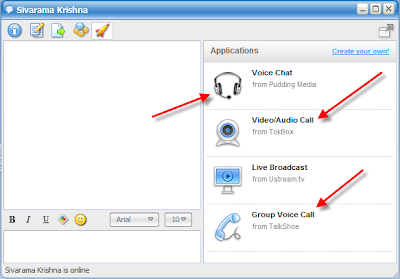
To avail Video and Voice chatting, open a chat window and click on rocket ship icon on the chat tool bar. The window expands and show different options to start Voice and Video chatting conversations.
Sandy, a Meebo blogger, says...
We're super excited to debut applications inside meebo! Just click on that shiny new rocket ship icon in any IM window and then select which app you want to launch with your buddy. The first type of application we're showcasing? Drumroll please... Voice and video chat :)
Via Meebo blog
Yahoo today released new version of Yahoo Messenger(v9) application for Windows users. This new version of messenger has nice features like inbuilt ability to play YouTube videos & Filckr albums, new skins, more emoticons and great look and feel.
In a chat conversation if someone sends YouTube video URL, Yahoo Messenger 9.0 allows you to play the video inside chat window without visiting YouTube website.

Yahoo Messenger 9.0 also allows you to preview images of Flickr photo streams, other web images and Maps inside the chat window.

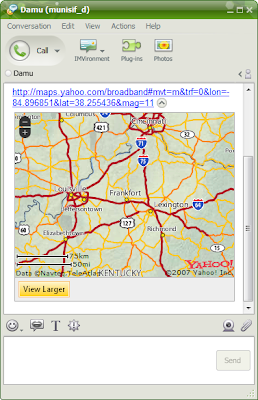
The new version of Yahoo Messenger 9 is a wonderful upgrade for regular users to share images, videos and other multimedia content on the web.
Another interesting feature is, you can configure Yahoo Messenger to deliver the IM messages received while you are Offline to a Mobile as SMS messages.
See the video demo released by Yahoo on the new features of Yahoo Messenger 9
Download Yahoo Messenger 9 for Window Vista and Windows XP