
While developing web/windows applications it is very useful to display human friendly currency values as $1,345.00 instead of 1345. In C#.NET it is simple to convert a number to currency format string using the method string.format and the format item C.
string.Format( "{0:C}", 123345);
Here is a fully functional sample code
class Program
{
static void Main(string[] args)
{
int nPrice = 1234;
string sString;
//
sString = string.Format("{0:C}", nPrice);
//
Console.WriteLine("Price: " + sString);
Console.ReadLine();
}
}
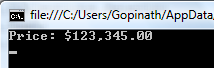
Changing the default currency symbol
If you execute the above sample code you might have seen a different currency symbol in the output other than $. The currency symbol used by string.format method depends on your operating system's regional settings. For instance if you are running the code on a OS configured with Indian regional settings you would have seen the output as Rs. 1,235.00.
If required you can change the currency to be used by String.Format method with the help of NumberFormatInfo class. Here is a sample code that forces string.format to use Pound as currency sign
System.Globalization.NumberFormatInfo nfi;
nfi = new NumberFormatInfo();
nfi.CurrencySymbol = "£";
sString = string.Format(nfi, "{0:C}", 123345);
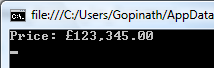
 custom painting of Windows user controls is very easy and even beginners can master the art of custom painting in couple of days.
 developers. Developers can download and browse the source code by accepting
  been told many times to use StringBuilder to concatenate strings. It is true that using StringBuilder improves performance of string concatenation operations. But it is not always true. There are few situations where StringBuilder perform slower than normal string concatenation operator +.
