Saturday, June 07, 2008

Ballmer Robot Screams Developers..Developers…

Hope you remember how Steve Ballmer screamed Developers…Developers, in a Microsoft Conference couple of years ago. Now Microsoft has developed a Robot that screams Developers..Developer, just like Ballmer . And also it can throw eggs!!

Watch the video of Bill Gates keynotes at Tech Ed 2008 demonstrating a Robot.

[end of post]

Thursday, May 29, 2008

Map Your Windows Local Drive Folder To A Drive Letter For Faster Access

You may ask the question, mapping a network folder to a drive letter is common, but why would anyone map a  local drive folder to a drive letter?

Let consider that you regularly access the folder "D:\Personal Files\Family\Media\Pictures\My Mobile Pictures" to save and organise the pictures captured using your mobile phone. Would it not be easier to access it using just H:\ instead of browsing through the lengthy folder structure?

By mapping local folder paths to a drive letter, we can avoid the irritating task of navigating multi level nested folders that we access frequently.

Here are the simple steps to be followed for mapping a local folder to a drive letter

  1. Select Start Menu --> Run(or use the keyboard shortcut Windows Key + R) and type cmd; opens MS DOS command prompt window
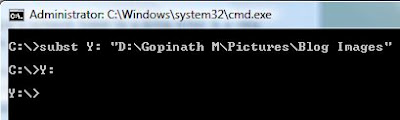
  2. Run the command SUBST <drive letter>: <local folder name> to map a local folder to a drive
  3. For example to map the local folder D:\Gopinath M\Pictures\Blog Images to X drive I would run the following command

subst X: "D:\Gopinath M\Pictures\Blog Images"


Deleting a Mapped Drive

To delete a mapping, simply type the command SUBST /D <Drive Letter>: . The following command deletes the virtually mapped drive  Y:

SUBST /D Y:

Wednesday, May 28, 2008

Bill Gates Preview Windows 7, iPhone Like Touch Interface

At D6 conference,  Microsoft showed a preview of Windows 7 Multi touch interface based on the same principles of Microsoft Surface. Windows 7 is expected to replace Vista by the end of 2009 or early 2010. Watch the demo video below

The demo shows touch enabled applications for organising photos, drawing images, a digital globe for exploring the maps and playing piano. The multi touch interface is really cool and it may eventually set  industry standards for new ways of user input to computers.

Apart from innovations on new ways to interact with computers, lets hope Microsoft Windows 7 will solve the problems introduced by Vista.

You can read more about Windows 7 here

Via TC

Sunday, May 25, 2008

Most Useful Windows Keyboard Shortcuts To Save Time

Keyboard shorts are very helpful to quickly complete the tasks and save significant amount of time.

Here are most useful Windows Keyboard shorts which I use daily


Windows Key - Open Start menu(alternately you can use Ctrl + Esc)

Windows Key + L - Lock the computer

Windows Key + E - Open Windows Explorer and show My Computer

Windows Key + M - Minimize all opened windows

Windows Key + D - Minimize all windows and show desktop

Windows Key + F - Open Find files

Windows Key + U - Open Ease of Access Center

Windows Key + R - Open Run dialog

Windows Key + Tab - Browse through the opened applications

Ctrl + C - Copy selected item

Ctrl + V - Pasted selected item

Ctrl + X - Cut the selected Item

Ctrl + A - Select all the items

Ctrl + Z - Undo last action

Ctrl + S - Save

Ctrl + O - Open

Alt + Tab  - Switch between opened applications

Alt + Enter - Open properties of selected items

Alt + F4 - Close program

Ctrl + F4 - Close file

Ctrl + Shift + Esc - Open Windows Task Manager

Hope these shortcuts are useful to you. If we missed any other useful shortcut which you use often, let us know through comments.


Thursday, May 22, 2008

Microsoft Office 2007 Will Convert Any Document To PDF

In a press release Microsoft announced that next service pack  of Microsoft Office 2007 will have the built in ability to convert any MS Office document to Acrobat PDF format.

With this move Microsoft Office 2007 Service Pack 2 will become a "first class citizen" application apart from Acrobat Professional to create PDF files.

This brings a great joy to the people who struggle converting word documents to PDF format using third party plug-ins and conversion tools.

Apart from PDF file writing capabilities, the service pack will also support saving documents in ODF(used by OpenOffice & other major web based office suites) and XPS format.

The service pack 2 is expected to be available by first half of 2009.

Via Digital Inspiration

Wednesday, May 21, 2008

Microsoft Uses Abode Flash Instead Of Microsoft's SilverLight

SilverLight, is the new technology from Microsoft to compete with Adobe Flash. Microsoft is heavily investing for SilverLight acceptance by user community and developer community.

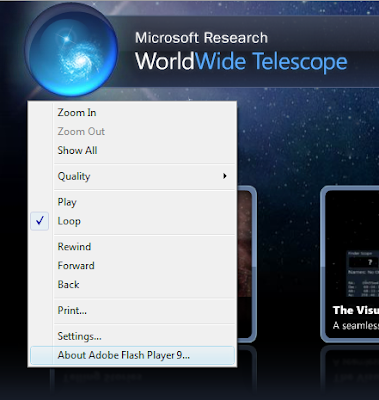
But the surprising fact is, Microsoft's own web sites are built with Adobe Flash instead of SilerLight. Recently Microsoft released a new product called Worldwide Telescope (to compete with Google Earth) and the official web site of the product is built with Adobe Flash!

It's not only http://www.worldwidetelescope.org/ that is using Adobe Flash but also other site like Zune, MSN Videos, Microsoft Surface, Visual Studio , Halo, XBOX & Live Search - Left vs Right are also built using Flash.

Does this mean that Microsoft is afraid of using their own product when they want to do serious business? Answer to the question seems to be Yes.

Flash is widely accepted, runs on many platforms other than Windows and non-IE browsers like Firefox & Opera. But SilverLight is not yet proved.

When Microsoft itself not willing to use SilverLight, how can we dare to use it?

Tuesday, May 20, 2008

Student Attacks Microsoft CEO Steve Ballmer With Eggs

A Hungarian student attacked Microsoft CEO Steve Ballmer with Eggs when the later was delivering speech at a Hungarian university.

As the video shows the student yells "Give back the money of the taxpayers" then started hurling eggs at Ballmer. The helpless Ballmer takes cover behind the desk till the officials move the the troublesome student to out of the hall.

Ballmer was smart enough to brush away the ugly incident and continued his speech.

This incident reminds about the way Bill Gates was attacked with a cake. Take a look at Bill Gates trouble times video.

Thursday, May 15, 2008

Learn To Use Windows Live Writer [Video]

Windows Live Writer is a powerful desktop application from Microsoft that allows bloggers to post content to blogs as simple as creating a Word documents. Live Writer supports posting content to almost all the popular blogs like Wordpress, Blogger, Typepad, live spaces, etc.

Microsoft has released a video that demonstrates the various features of Windows Live Writer and also how to use those features.

For bloggers who don't know to use Windows Live Writer this is a must watch video.

>>Download Live Writer   >>Live Writer Home   >>Live Writer Plugins

Thursday, May 08, 2008

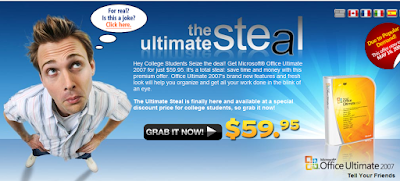
Microsoft Gives 91% Discount On MS Office 2007 If You Own .edu E Mail Address

Microsoft is giving 91% discount on retail price of Microsoft Office 2007 to all the students in United States who own a .edu email address. Most college alumni offices give their graduates .edu addresses.

The actual price of Office 2007 Ultimate is $680, and now  available at $60 for students until May 16th.

Microsoft-Office-91-percent-discount

If you meet the following criteria then you can right away check this site to order cheap Office 2007 copy

  1. Individual must possess a valid e-mail address at a U.S. educational institution which contains the domain suffix .edu;
  2. Individual must be a student at a U.S. educational institution and must be actively enrolled in at least 0.5 course credit and be able to provide proof of enrolment upon request.

The Ultimate Steal [via Lifehacker]

Wednesday, May 07, 2008

Tricks To Install Yahoo & MSN Messengers On a Computer Not Connected to Internet

Yahoo-MSN-Messenger-Logos The latest versions of Yahoo & Microsoft MSN Messenger are installed with the help of online installer applications.

An online installer application is a small file which is downloaded first; it will then launch, download the required program from servers and begin installation automatically.  This means that the  computer on which you are trying to install Yahoo/MSN Messenger should be connected to Internet.

It is not only Yahoo & Microsoft but also other software giants like Google & Adobe are making the assumption that users are connected to Internet while installing software.

The online installation has many benefits like automatically detecting the parameters of the  computer and downloading the required binaries for installation. But what about the computers that does not have access to Internet? How do we Install Yahoo Messenger and MSN Messenger?

Here are the direct links to bypass online/web installers of Yahoo & MSN Messengers and download the offline installers

Links to Download Yahoo Messenger Offline Installer

Download Windows XP Version

Download Windows Vista Version


Trick to download MSN Messenger Offline Installer

There is no direct link to download MSN Messenger offline installer but we can backup the installer from web installer. Follow these steps to take a back of MSN offline installer

  1. Go to Windows Live Installer
  2. Choose Messenger Application alone from the products list
  3. Click on Install. This downloads a web installer and then it automatically installs MSN Messenger
  4. Wait till the installation is completed
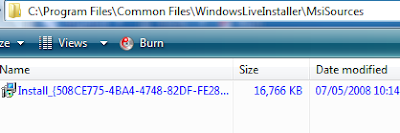
  5. Open the folder C:\Program Files\Common Files\WindowsLiveInstaller\MsiSources
  6. You will find a file with the name Install_{Random Name}.msi and size of the file close to 16 MB
  7. Take backup of this file and rename it as MSN Messenger.msi
  8. Use the backup MSI as stand alone MSN Messenger Installer

MSN-Messenger-Offline-Install-MSI

Thanks Ashish SainiRaymond

Sunday, May 04, 2008

Is your Internet Explorer Not Playing GIF Animations? Here Is The Solution.

Is your Internet Explorer web browser is not playing GIF animations of web pages? Internet Explore does not play animation if the play animations feature is disabled.

To resolve the problem you need to enable the animation playing feature by following these simple steps

  1. Open Internet Explorer browser
  2. Follow to menu option Tools --> Internet Options
  3. Select the Advanced tab  page
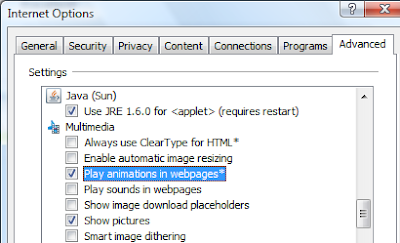
  4. Scroll down and locate the section Multimedia in the tree view display
  5. Tick the option Play animations in web pages
  6. Restart your browser

Now open any website that contain animations, Internet Explorer plays the animations.

Sunday, April 13, 2008

Microsoft Windows OS Will Collapse By 2011. Gartner Analysts Predicts.

In a sensational report by Gartner analysts claim that Microsoft Windows Operating system is collapsing. Micheal Silver and Neil McDonalads, the Gartner analysts in a presentation at Las Vegas said that Microsoft should make radical changes to Windows otherwise it is at risk of loosing the market.

Microsoft has not responded to the market,is overburdened by nearly two decades of legacy code and decisions, and faces serious competition on a whole host of fronts that will make Windows moot unless the software developers acts.

Today 70 to 80 percent of corporate applications requires Microsoft Windows to run. But by 2011, Gartner analysts expecting that majority of these application will be OS-agnostic, such as Web application.

Read more at PC World and ComputerWorld

Thursday, April 10, 2008

Yahoo Partners with Google To Fight Against Microsoft

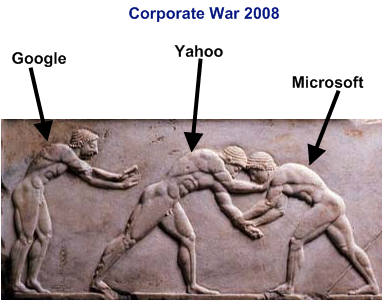
The corporate war between Yahoo and Microsoft is turning ugly day by day. We would think companies of this size, the size of Microsoft and Yahoo, never stop so low. But it is happening.

Microsoft offered a bid to acquire Yahoo couple of months ago and Yahoo rejected it stating bidding price is very less.  Microsoft continued to pursue Yahoo bid by threatening to overturn Yahoo's board of directors with the help of share holders.

In reply to Microsoft's Threat  Yahoo joined hands with Google by signing an agreement to run Google Ads on Yahoo search pages. Yes what you read is absolutely right. Yahoo is going to test run displaying Google Ads instead of their own ads!.

Yahoo!’s board of directors is exploring strategic alternatives to maximize stockholder value, including exploration of potential commercial business arrangements.

Microsoft has respondedto Yahoo's partnership with Google

Any definitive agreement between Yahoo! and Google would consolidate over 90% of the search advertising market in Google’s hands. This would make the market far less competitive, in sharp contrast to our own proposal to acquire Yahoo! We will assess closely all of our options. Our proposal remains the only alternative put forward that offers Yahoo! shareholders full and fair value for their shares, gives every shareholder a vote on the future of the company, and enhances choice for content creators, advertisers, and consumers.

Via TC

Tuesday, April 08, 2008

Yahoo to Microsoft: We Are Ready to Sell Yahoo!, But Pay Us More.

Yahoo has responded to Microsoft's 3 week ultimatum and said they are ready to sell Yahoo! if more money is offered. Jerry Yang, the CEO  and Roy Bostok, the chirman of Yahoo! sent a letter to Steve Balmer which states

Dear Steve..... we will not allow you or anyone else to acquire the company for anything less than its full value.......We consider your threat to commence an unsolicited offer and proxy contest to displace our independent Board members to be counterproductive and inconsistent with your stated objective of a friendly transaction..........We regret to say that your letter mischaracterizes the nature of our discussions with you.

Thursday, April 03, 2008

Google's Orkut Is Powered By Microsoft .NET Technology!!

Do you know that Google's social networking web site Orkut.com is powered by Microsoft technology? We just learnt that Orkut is powered by its rival company's ASP.NET technology. All the page URLs of Orkut ends with the extension .aspx, which is file extension of Microsoft ASP.NET web pages.

Here are the few web page URLs of Orkut

Orkut was developed independently by Orkut Büyükkökten, a Turkish software engineer working at Google. It's surprising to see that Google employees are fond of Microsoft Technologies.

Thursday, March 27, 2008

Easily Find Out When Was the Computer Turned On

Want to know when was the computer turned on? It is very easy. Open command prompt and execute the simple command systeminfo | find/I "Boot Time" . It displays the date and time at which computer was last booted as shown in the below image.

When SystemInfo command is executed, it gather system information like OS Version, Hot fixes installed, network to which it is connected and other parameters.

If you observe the command which we issued, a Find filter is used to filter the output of SystemInfo command to display only System Boot Time. Try executing SystemInfo command in the command prompt to have a look at valuable information about your system. [via Amit]

Tuesday, February 19, 2008

How to get updates for your windows as well as other Microsoft products like Office or msn.

Normally when you start visit windows Update, the panel gives only a list of updates available to your Windows.You then decide which updates you want to download and install.

If you’ve got other Microsoft products like Office or Windows Defender installed, then you can configure Windows Update to download updates for these applications too.

Windows update

On the main window click on “Get updates for more products” showing at the bottom of the window in the above screen shot.This opens Internet Explorer and directs you to Windows Update online. Tick the checkbox “I accept the Terms of Use” and click Install.

Windows update 

To switch back to Windows Update default settings always you can use "change settings" option in the main window.

Wednesday, January 09, 2008

Want To See 2008 Beijing Olympics Live On Internet? Then Install Microsoft SilverLight.

Are you planning to watch live 2008 Beijing Olympics live at office on NBC Sports website? Are you planning to watch replays and on demand videos of 2008 Olympics online? Then you need to know what is Microsoft Silverlight and you should also install it.

Bill Gates yesterday at the CES Keynote announced that NBC Sports and Microsoft are working together to build NCBOlympics.com with the help of Microsoft Silverlight platform to deliver deeply immersive user experience.

The Silverlight technology which is considered as a competitor to Adobe Flash will be used extensively in NBC site to deliver rich full screen videos. The NBC will host  2,200 hours of live events coverage with 20 simultaneous live video streams at peak times. Look at this Adobe, Microsoft is fully geared to fight with you!!

This is a very good news to Microsoft as their just matured Silverlight technology will be forced to install and use by millions of people to watch Olympics online. Can you guess how much Microsoft would have paid to NBC?

>>Download and Install Microsoft Silverlight

Saturday, January 05, 2008

Microsoft Offers Free Arcade Game To Compensate Xbox Live Holiday Problems

Xbox Live, the online game service offered by Microsoft for users of its Xbox video game console was having some trouble during holiday season.

As recompense for nearly two years of outages, Microsoft is offering full, free Xbox Live Arcade title free of charge to all members.

In a statement posted by Xbox Live general manager Marc Whitten said that the problem with Xbox Live downtime were caused by an influx of new users. Whitten said

During this past holiday season you helped us break a number of Xbox LIVE records.  This included our largest sign-up of new members to Xbox LIVE in our 5 year history and just yesterday you broke the record for the single biggest day of concurrent members ever on the service. 

As a result of this massive increase in usage we know that some of you experienced intermittent Xbox LIVE issues over the holiday break.

Although the service was not completely offline, it was a disappointment for many users for not being able to access it. So Microsoft decided to please all the members with a free game.

The free game is already posted to very few users and will be available to all users in the coming weeks. If you have an Xbox Live account, Microsoft would have just posted a free game to you. Check your account.

Microsoft Zune in Pink - To Please All Ladies

Hey girls!! Here is the news you have been waiting for - The so sweet, so cute Pink Zune from Microsoft is coming on May 1st, 2008.

It is price tagged with $299 and the features are same like other Zune players available in the market and hopefully with firmware 1.3.

Last year Microsoft surprised purchasers by releasing 100 limited edition pink Zune and few of them sold at $960(~3 times more) on ebay.

This high demand for pink Zunes inspired Microsoft to release them in the mainstream.