Wednesday, January 23, 2008

SQL Server Synonyms Explained In Simple English [SQL Server 2005]

What are Synonyms?

SYNONYMS in SQL Server 2005 allows developers to create alias names for database objects and refer the database objects with alias names where ever required.

What is the benefit of using Synonyms?

Lengthy database objects names can be referred with simple and small alias names. Increases readability of the script.

Example

Querying a table located on a remote server without a synonym

SELECT * FROM Server1.AdventureWorks.Production.ProductCategory

GO

INSERT INTO Server1.AdventureWorks.Production.ProductCategory(……) VALUES(…..)

GO

Querying a table located on a remote server with a synonym

--Create a synonym

CREATE SYNONYM ExTbl_ProdCat FOR Server1.AdventureWorks.Production.ProductCategory

GO

--Query data with the help of synonym

SELECT * FROM ExTbl_ProdCatGOINSERT INTO ExTbl_ProdCat (……) VALUES(…..)

GO


What are the different Database Objects that can be synonymised?

  1. Assembly (CLR) Stored Procedure
  2. Assembly (CLR) Table-valued Function
  3. Assembly (CLR) Scalar Function
  4. Assembly Aggregate (CLR) Aggregate Functions
  5. Replication-filter-procedure
  6. Extended Stored Procedure
  7. SQL Scalar Function
  8. SQL Table-valued Function
  9. SQL Inline-table-valued Function
  10. SQL Stored Procedure
  11. View
  12. Table (User-defined)

Want to read more?

Follow these links to read more about synonyms
Thursday, January 03, 2008

How to Find Recently Executed Queries In SQL Server [SQL Server 2005]

Today we came across a situation which required to find out recently executed queries to analyse the modifications carried out on a database server.

Here is the query which we used to find out the recently executed queries along with the date and time at which they were executed

SELECT

    DMExQryStats.last_execution_time AS [Executed At],

    DMExSQLTxt.text AS [Query]

FROM

    sys.dm_exec_query_stats AS DMExQryStats

CROSS APPLY

    sys.dm_exec_sql_text(DMExQryStats.sql_handle) AS DMExSQLTxt

ORDER BY

    DMExQryStats.last_execution_time DESC


Hope this will be useful to you also.

[end of post]

Saturday, December 29, 2007

Mirrored Backups - Take Multiple Copies of Backups With a Single Command [SQL Server 2005]

SQL Server 2005 BACKUP DATABASE statement allows mirroring of backup files to multiple media and locations. Mirroring a database backup increases reliability and availability of backups by creating multiple copies.

For example the following statement takes backup of the the database Northwind to two different locations D:\DataabseBkps_Set1 and E:\DataabseBkps_Set2.

BACKUP DATABASE Northwind

TO DISK = 'D:\DataabseBkps_Set1\Northwind.bak'

MIRROR

TO DISK = 'E:\DataabseBkps_Set2\Northwind.bak'

WITH FORMAT;

If backup in one location corrupts, you can access the another backup. So you are creating a backup to backup.

The MSDN description on MIRROR TO clause says

Specifies a set of one or more backup devices that will mirror the backups devices specified in the TO clause. The MIRROR TO clause must be specify the same type and number of the backup devices as the TO clause. The maximum number of MIRROR TO clauses is three.

This option is available only in SQL Server 2005 Enterprise Edition and later versions.

Thursday, December 27, 2007

How To Decide Whether to Rebuild or Reorganize Table Indexes [SQL Server]

Database Administrators sometimes get doubt whether to rebuild the indexes or reorganize the indexes. Before deciding the right option lets try to understand the difference between rebuilding and reorganizing.

When an Index is rebuilt, the existing index is dropped and a new one is created. This operation takes long time and utilizes lot of SQL Server resources like CPU cycles and disk space.

When an index is reorganized, the index is not dropped and recreated but the leaf level pages of the index are defragmented by physically reordering to match the logical order.

As rebuilding indexes is an expensive operation, DBA should carefully choose when to rebuild over reorganising the indexes by analysing the degree of fragmentation in the indexes. The general guidelines given in MSDN says

  • Reorganise an index when the degree of fragmentation is between 5 and 30%
  • Rebuild an index when the degree of fragmentation is over 30%

These are guideline values and the actual degree of fragmentation  varies case to case depending on many parameters of the database server environment. It is always advised to perform multiple tests to identify the exact degree of fragmentation which decides whether to rebuild or reorganize.

Example Script to Rebuild and Reorganize an Index

-- SQL Server Script to rebuild the index

-- 'PK_Employee_EmployeeID' available on

-- 'Employee' table

ALTER INDEX PK_Employee_EmployeeID

ON Employee

REBUILD;

-- SQL Server Script to reorganize the index

-- 'PK_Employee_EmployeeID' available on

-- 'Employee' table

ALTER INDEX PK_Employee_EmployeeID

ON Employee

REORGANIZE ;

Saturday, December 22, 2007

Retrieving a Random Record using SELECT Statement[SQL Server]

When we were developing a small client server application using C# and SQL Server, we had a requirement to select a record randomly from a database table and show it to the user.

First we tried bringing a set a qualifying record to front end and randomly pick one using C# code. But this is proven as a very inefficient way as unnecessarily records are being fetched from database and discarded after selecting one random record.

We started looking for an efficient way through which a random record can be picked using SQL script and fetch that record alone out of database.

We succeeded to pick the random record using a simple SELECT statement trick. All we need to do to randomly pick a record is, SELECT TOP 1 record from the table and order it using NEWID() function. Here is the sample code

SELECT TOP 1 Id, FirstName, LastName, Age, DateOfBirth

FROM Employee

ORDER BY NEWID()


In order to test how good this method is going to randomise the data, a small test is performed on a table containing 429 records.  The results are pretty impressive and the data is properly randomised in the 100 test runs as shown in the following chart.

Selecting a random record using SELECT statement - Test results

Wednesday, November 28, 2007

SQL Server: Check Whether All Characters In a String Are in Uppercase or Not

When I was developing a small application, I had to write a Microsoft SQL Server script to check whether all the characters in a given string are uppercase alphabets or not.

Here is the Microsoft SQL Server function code which performs the check. This code is compatible with Microsoft SQL Server 2000 and Microsoft SQL Server 2005.


/****************************************************************

 * Purpose: Check whether all characters

 *         in a string are capital alphabets or or not

 * Parameter: input string

 * Output: 0 - on success; 1 on failure

 ****************************************************************/

CREATE FUNCTION fnChkAllCaps(@P_String VARCHAR(500))

RETURNS BIT

AS

BEGIN


DECLARE @V_RetValue BIT

DECLARE @V_Position INT


SET @V_Position = 1

SET @V_RetValue = 0   


--Loop through all the characters

WHILE @V_Position <= DATALENGTH(@P_String)

           AND @V_RetValue = 0

BEGIN


     --Check if ascii value of the character is between 65 & 90

     --Note: Ascii value of A is 65 and Z is 90

     IF ASCII(SUBSTRING(@P_String, @V_Position, 1))

            BETWEEN 65 AND 90

        SELECT @V_RetValue = 0

    ELSE

       SELECT @V_RetValue = 1      

   --Move to next character       

   SET @V_Position = @V_Position + 1

END


--Return the value

RETURN @V_RetValue


END


Sample code to test the function


SELECT dbo.fnChkAllCaps('TECHTHOUGHTS') -- Returns 0

GO

SELECT dbo.fnChkAllCaps('TechThoughts') -- Returns 1

GO


The above function iterates through all the characters of a given input string and checks whether ASCII value of the characters is between 65 and 90 to verify it is an uppercase alphabet or not.

You might be wondering why is ASCII values check is between 65 and 90. It is because the ASCII value of uppercase A is 65 and uppercase Z is 90.

Soon I'll rewrite the same code using SQL Server 2005 CLR functions and post it. I believe Microsoft SQL Server 2005 CLR functions perform this check very efficiently.

Monday, November 12, 2007

SQL Server 2005: Adding Row Numbers To a SELECT Query Result

If you are a SQL Server 2000 programmer you would be definitely knowing the pain in generating sequence numbers to a SELECT query output. But in SQL Server 2005 it is quite easy. Thanks to Microsoft for introducing a new function called ROW_NUMBER() in SQL Server 2005.

ROW_NUMBER() function of SQL Server 2005 allows us to add sequence numbers to a result set of SELECT query. This function generates numbers starting from 1 and incrementing it for each row in the result set.

Let us see to ROW_NUMBER() in action with an example SQL Server 2005 SQL script.

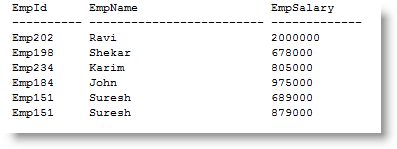
Create an Employee table and populate it with sample data as shown below.

--Create Employee table

CREATE TABLE Employee

(

    EmpId Varchar(10),

    EmpName Varchar(25),

    EmpSalary Numeric(12,0)

)

--Insert sample records

INSERT INTO Employee

    VALUES( 'Emp202', 'Ravi', 2000000)

INSERT INTO Employee

    VALUES( 'Emp198', 'Shekar', 678000)

INSERT INTO Employee

    VALUES( 'Emp234', 'Karim', 805000)

INSERT INTO Employee

    VALUES( 'Emp184', 'John', 975000)

INSERT INTO Employee

    VALUES( 'Emp151', 'Suresh', 689000)

INSERT INTO Employee

    VALUES( 'Emp151', 'Suresh', 879000)

--Query the table

SELECT     EmpId,

        EmpName,

        EmpSalary

FROM Employee

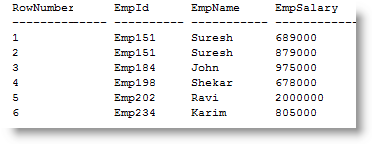
Use the ROW_NUMBER() function as shown below to assign sequence row numbers to the result set.

SELECT (ROW_NUMBER()

        OVER (ORDER BY EmpId) )as    RowNumber,

        EmpId,

        EmpName,

        EmpSalary

FROM Employee

The OVER() clause next to the ROW_NUMBER() functions tells the SQL Engine to sort data on the specified column and assign numbers as per the sort results. In the above example, result set is order by EmpId and sequence number are assigned to each row.

Saturday, November 10, 2007

SQL Server 2005 Trace Flags FAQ

Trace Flags of SQL Server 2005 are a interesting topic. Even though Developer may not be using them much, Administrators and Performance tuning engineers regularly work them. Lets find out what are Trace Flags.

  1. What are Trace Flags and why are they used?
  2. What are the different types of Trace Flags?
  3. What is the difference between Global Trace Flag and Session Trace Flag?
  4. If a Session Trace Flag is enabled in Session A, will it affect Session B?
  5. How to configure Trace Flags?
  6. Is it possible to enable session Trace Flags using startup options?
  7. How to enable the trace flag 3205 for a session?
  8. How to enable the trace flag 3205 globally?
  9. Where can I read more information on Trace Flags?

1. What are Trace Flags and why are they used?

Trace Flags are used to temporarily enable or disable specific behavior of SQL Server. For example, if the Trace Flag 7806 is set SQL Server 2005 allows Dedicated Administration Connections.

2. What are the different types of Trace Flags?

SQL Server 2005 supports Session level Trace Flags and Global level Trace Flags.

3. What is the difference between Global Trace Flag and Session Trace Flag?

Global trace flags are active at the server level and are visible to all the existing connections and new connection of the server.

Session level trace flags are active only to the current user session and they are visible to the current connection.

4. If a Session Trace Flag is enabled in Session A, will it affect Session B?

No. Session B will not be able to see any changes.

5. How to configure Trace Flags?

Trace flags are configured can be configured in two way. Using either DBCC TRACEON/TRACEOFF to configure session and global trace flags or -T startup option of SQL Server service to enable trace flags globally.

6. Is it possible to enable session Trace Flags using startup options?

No. It is not possible to enable session level trace flags using –T startup option. The startup option is used only to enable global trace flags.

7. Example: how to enable the trace flag 3205 for a session?

Execute the command DBCC TRACEON 3205

8. Example:how to enable the trace flag 3205 globally?

Execute the command DBCC TRACEON 3205, -1. Note the extra parameter -1 which instructs to apply the trace flag globally.

9. Where can I read more information on Trace Flags?

Read the MSDN article on Trace Flag

Tuesday, November 06, 2007

Turning Implicit Transactions ON/OFF in SQL Server 2005 Management Studio/Workbench

Oracle client by default starts an implicit transaction for all the connections. But in SQL Server by default implicit transactions are OFF which results in automatic committing of all queries which we execute in SQL Server Management Studio/Workbench. But there is a way by which we configure SQL Server 2005 Management Studio/Workbench to start implicit transactions just like oracle client.

Let us see how to enable implicit transactions in SQL Server 2005 Management Studio/Workbench

  1. Open SQL Server 2005 Management Studio/Workbench
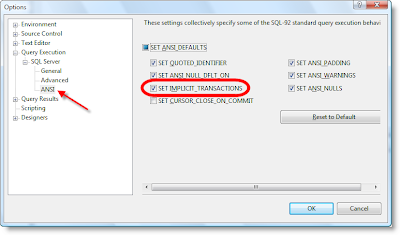
  2. Choose the menu item Tools-->Options..; opens Options window
  3. In the left side of the window, navigate the tree view to Query Execution/SQL Server/ANSI; displays a set of options on right side panel.
  4. Select SET IMPLICIT_TRANSACTIONS to true by ticking the check box
  5. That's all from now onwards all the new connections opened through Management Studio/Workbench starts an implicit transactions

Set Implicit Transactions ON/OFF in SQL Server 2005 Management Studio - Image

Sunday, November 04, 2007

CREATE DATABASE Permission Denied - SQL Express 2005 Problem and Solution

Today I installed SQL Express 2005 on my Windows Vista PC and a SQL Server Express 2005 instance with the name GopinathMPC\SQLExpress is created successfully.

As a first step of using the new SQL Server Express 2005 I started creating a database with the query

CREATE DATABASE TestDB

GO

Unexpectedly execution of the above query failed with the following error message

Msg 262, Level 14, State 1, Server GOPINATHM-PC\SQLEXPRESS, Line 1
CREATE DATABASE permission denied in database 'master'.

The error message indicates that I don't have enough permissions to create the database. The login which I'm using to access my Windows Vista has administrative privileges, but still I'm not granted administrative privileges on the SQL Server instance.

Looking through the documentation of SQL Server Express, I found the that

Windows Vista users that are members of the Windows Administrators group are not automatically granted permission to connect to SQL Server, and they are not automatically granted administrative privileges.

Now it is very clear that event though I'm an administrator on my Windows Vista OS I don't have administrative rights on SQL Express 2005 Server. So I need to get administrative rights.

How to Grant Administrative Rights on SQL Express 2005?

  1. Log in to Windows Vista using your administrative account
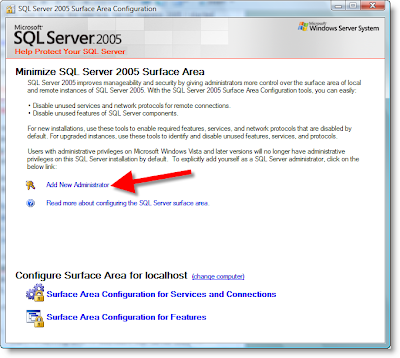
  2. Open SQL Server Surface Area Configuration Application ( Start --> All Programs --> Microsoft SQL Server 2005 --> Configuration Tools -->SQL Server Surface Area Configuration)
  3. Click on Add New Administrator (pointed in the image) link

CREATE DATABASE Permission Denied - SQL Express 2005 - Image 1

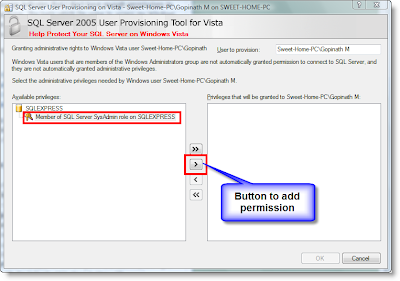
  1. A new window with title 'SQL Server User Provisioning on Vista' popup and displays the permissions on the left panel.
  2. Select the permission 'Member of SQL Server SysAdmin role on SQLEXPRESS' available on the left panel and add it to the right panel with the help of add button( button with > text) available in the window.

CREATE DATABASE Permission Denied - SQL Express 2005 - Image 2

  1. Click on OK button to save the changes.
  2. That's all now your Windows login has administrative privileges on SQL Server.

Thursday, January 25, 2007

Vardecimal data type

VARDECIMAL is the new data type introduced in to the family of SQL Server 2005 data types. This is an interesting data types with many advantages. The following are few reference document which are available on the net

Tuesday, December 26, 2006

Loading images and text files in to database using Import Column Transformation

Import Column Transformation is used to add Text, image and xml content from files to a data flow stream. It allows users to read content available in flat files and loads it in to a column like Image, Text, NText and XML. Lets see an example on how to load content of images into to a database table using this component.

1. First search your computer and locate few images and copy them in to folder. I assume that you are copying files a.jpg, b.jpg, c.jpg and d.jpg in to folder ‘C:\InputImages’.

2. Then prepare a sample input file with the following content

ImageId, ImageFilePath
a.jpg, C:\InputImages\a.jpb
b.jpg, C:\InputImages\b.jpb
c.jpg, C:\InputImages\c.jpb
d.jpg, C:\InputImages\d.jpb

3. Drag and drop a Flat File Source in to a data flow task.

4. Configure the flat file source so that it points file which contains the above content(step 2).


5. Then drag and drop a Import Column Transformation in to the data flow and attach output of flat file source to Import Column transformation.


6. Now we have to configure the Import Column transformation. Double click on Import Column Component; it opens a dialog similar to the one below. Switch to InputColumns tab and select the column ImagePath as input column. We have to select a column which holds path of the images as input column, so that the Import Column transformation can read the files content and load it in to memory.

7. After configuring the input column, then switch to ‘Input and Output Properties’ tab to add an output column and link the output column to input column.

8. Browse and select the node ‘Import Column Output->Output Columns ‘ and click the Add Column button. Name the newly added column as ImageContent.

9. After adding the output column, remember value of ID property(in the above image it is shown as 49) and enter the value in FileDataColumnId property of input column(show in the image below)

10. After configuring Import Column Transformation, then Drag and drop an OLE DB Destination and attach output of Import Column transformation to OLE DB Destination

11. Make sure that your OLE DB Destination is going to point to a table which can hold ImageId and ImageContent and map the columns

12. That’s all your package is ready to import data available in flat files in to database tables

Thursday, December 21, 2006

Adding description of error codes to an error output

When an error output of a SSIS component (ex: Lookup, Derived column, etc) is directed to another downstream components, SSIS automatically adds ErrorCode and ErrorColumn columns. The ErrorCode column of every row holds an integer values which represents an error occurred in the associated component. If you want to generate a report of failed records and send it to your colleagues, error codes may not make any sense in your report. It is always a good idea to give description which says what is the problem associated with every row. In order to get description of the error codes, we can use the method Me.ComponentMetaData.GetErrorDescription()
in a script component and append the description of error to every bad row. The
following piece of code in a script component can be used to get description of
every error and assign it to a input row column ErrorDescription.


Public Overrides Sub Input0_ProcessInputRow(ByVal Row As Input0Buffer)
Row.ErrorDescription = _
Me.ComponentMetaData.GetErrorDescription(Row.ErrorCode)
End Sub


Note: It is assumed that a Script component is attached to an error output with an output column ErrorDescription.

The following image shows a sample ssis data flow tasks

Wednesday, December 20, 2006

Using SQL Server 2005 Exception Message box in your C# Application


SQL Workbench of SQL Server 2005 has a beautiful user interface. An interesting dialog for most of the developers in that user interface is Exception Message box.When ever an error occurs SQL Work bench shows that error with full information about the exception and a sample dialog box is shown below


If wish to use the same messagebox to show exceptions raised in your .NET application then you are lucky. Microsoft has exposed the message box class ExceptionMessageBox in the dll Microsoft.ExceptionMessageBox. The following is the sample code to demonstrate use of the exception message box

private void Form1_Load(object sender, EventArgs e)
{
try
{
int a, b, c;

//Set values
a = 10;
b = 0;
//Raise error
c = a / b;
}
catch (Exception exp)
{
ExceptionMessageBox objMsgBox;

objMsgBox = new ExceptionMessageBox(exp);
objMsgBox.Show(this);
}
}

Update values of a variable in a Script Task or Script Component

Recently I tried updating value of a variable inside a Script Task, but application was hanging. There was no response from the system when ever the script task tried to update value of the variable.The code which I was using to update the variable was

Public Sub Main()

Dim vars As Variables

Dts.VariableDispenser.LockOneForWrite("nCounter", vars)

vars("nCounter").Value = 1980
Dts.TaskResult = Dts.Results.Success
End Sub


When the code is debugged using a break point, we noticed application is hanging while trying to execute the line Dts.VariableDispenser.LockOneForWrite("nCounter", vars). After analyzing some time we identified the problem as a deadlock caused by execution of the above statement. A deadlock is created by the above statement as we have mentioned the variable nCounter
name in
ReadWriteVariables property of Script Task. When a variable name is mentioned in ReadWriteVariables property, SSIS automatically locks the variable for writing. So if you would like maintain locking of the variables in your script then don’t mention the variable name in ReadWriteVariables property.

For simplicity if you would make use of scripting task locking mechanism then use the following the code to update values of the variables

Public Sub Main()

Dts.Variables("nCounter").Value = 100

Dts.TaskResult = Dts.Results.Success

End Sub

Wednesday, December 13, 2006

SQL Server 2005 Performance tuning white papers

A set of whithe papers on SQL Server 2005 best practices are available at http://www.microsoft.com/technet/prodtechnol/sql/bestpractice/default.mspx. The topics covered are

  1. SQL Server 2005 Performance Tuning using Waits and Queues
  2. TEMPDB Capacity Planning and Concurrency Considerations for Index Create and Rebuild
  3. Loading Bulk Data into a Partitioned Table
  4. DBCC SHOWCONTIG Improvements and Comparison between SQL Server 2000 and SQL Server 2005
  5. Database Mirroring Best Practices and Performance Considerations
  6. Troubleshooting Performance Problems in SQL Server 2005
  7. SAP with Microsoft SQL Server 2005: Best Practices for High Availability, Performance, and Scalability