Wednesday, May 28, 2008

Find Who Owns a Web Site

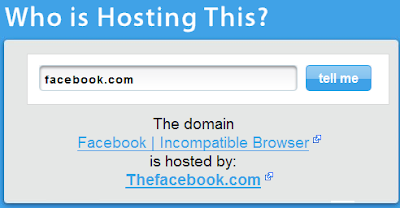
If you ever wanted to know who owns a web site then Who Is Hosting This is the right service to know the details.

Enter the web site address and this service tells you who is the owner of a web site.

This service also displays information of the web hosting service that powers the web site.

Monday, May 12, 2008

How To Convert Microsoft Word Documents to PDF Files Online

It's no more required to install software on your computer to freely convert Microsoft Word documents to Acrobat Reader PDF files. Many free services are available online that convert Word to PDF quickly. The output PDF file will look exactly like your source document retaining all the text formatting, colours and images.

One of the best free online services that converts Word to PDF file format is Google Docs.  Let see how to use Google Docs

Using Google Docs To Convert Word to PDF

Google Docs, the online word processing and spreadsheet from Google is rapidly eating Microsoft Office share. This online service has a nice feature that allows us to upload word documents and download them as PDF files. Here is the step-by-step guide for conversion

1. Login to Google Docs service using your Google Account

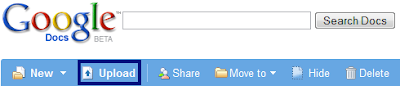
2. Click on the Upload link

Converting-MS-Word-To-PDF-Online-Image2

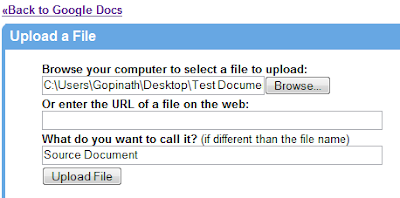
3. Use the Browse button to locate the source Word document that you want to convert to PDF

Converting-MS-Word-To-PDF-Online-Image2

4. Upload the source Word document by clicking on Upload File. Wait till Google Docs completes uploading and opens the document(this operation takes few seconds depending on your Internet speed and size of source word document).

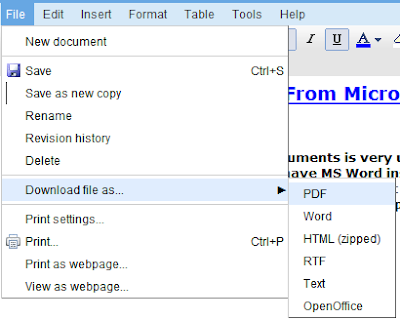
5. Select the option File --> Download the file as... --> PDF and choose the location where you want to save the converted PDF document

Converting-MS-Word-To-PDF-Online-Image3


If you are interested to install free software that converts virtually any file to PDF use Cute PDF or for other way conversion(PDF-Word) use this application.

Sunday, May 04, 2008

Generate Ajax Load Progress Animations Easily

AjaxLoad is a free web application that allows you to easily generate animations for Ajax Load operations.

The user interface of AjaxLoad site is very simple and even non technical users can easily learn to customize and download animations in couple of minutes.

Also the web application provides a wide range of animation templates and colour customisation options to create the animation that suits your web site / blog.

http://www.ajaxload.info/

Thursday, April 24, 2008

Convert YouTube Videos To Animations

If you want to convert YouTube videos to a GIF animation and share the animation with your friends/colleagues here is a simple solution from Gickr.

Gickr is a free online service that allows you to convert YouTube videos to GIF animations. The output animations of Gickr can be easily downloaded to your computer and shared with your friends/colleagues.

To convert a YouTube video to GIF animations

  • Copy URL of the YouTube video which you want to convert and paste it in Gickr Conversion Page
  • Choose the size and the number frames of output animation(you can leave it to default selections)
  • Click on the next button

That's all! Gickr will automatically generates the GIF image and provides you options for downloading the GIF or embedding it in your website or blog.

Via Digital Inspirations

Wednesday, March 19, 2008

Access Blocked AIM/Google Talk/Yahoo Messenger/MSN Messenger At Your Office, School, College or University

There are so many easy ways to access most of the blocked websites. In our earlier posts we explained 4 different ways to access any blocked website, tricks for accessing blocked Orkut, Access Blocked YouTube at Office / School / University and Accessing Blocked Web Sites at WiFi Hotspots.

Now let us learn how to access Instants Messengers(IMs) like MSN Messenger/Windows Messenger, Google Talk and Yahoo Messenger when they are blocked at your Office/

The work around to access blocked Instant Messenger is to use Web Messengers. Web Messenger are very easy to use as there is no need to download and install any software/plugins.

Access Blocked AIM/Google Talk/Yahoo Messenger/MSN Messenger At Your Office, School or University - Image

There are many of web messengers available today which allows you to login to most of your favourite messengers at a time. Here is the list of web messengers which allows you to log in to AIM, Google Talk, MSN/Windows Live Messenger and Yahoo Messenger.

  1. Meebo
  2. eBuddy
  3. ILoveIM
  4. KoolIM
  5. SNIMMER
  6. Mabber
  7. MessengerFx

The following are the official web messengers form AOL, Google, Microsoft and Yahoo which allows you to connect to respective messengers

  1. AIM Express
  2. Google Talk
  3. MSN/Windows Live Web Messenger
  4. Yahoo Web Messenger

It is most unlikely that your organisation would have blocked these web messengers too. It is suggested to try at least 3 of the above websites to get access.

Do let us hear through comments if you know any other tricks or popular web messengers that we missed to cover.

Disclaimer: Use these tip and tricks at you own risk. Your organisations may consider accessing blocked web sites and messengers as breach of security policies and guidelines that may result in any inconvenience.

Thursday, December 13, 2007

Definr - Incredibly Fast Online Dictionary

Definr - incredibly fast dictionary, lives up to the caption. It is a single page, simple online dictionary that delivers results to queries almost instantly and suggest words as you type just like Google Suggest and Yahoo Suggest.

Definr promises an average word lookup time as 14ms and when we visited the site statistics page it is around 110ms.

Definr web framework is on Ruby powered by Rails with MySQL as a back end server. On average the servers cache 10000 words in memory so that the results are delivered nearly instantly.

You might be wondering why use Definr when there are many well established sits Dictionary.com or Google Search define keyword? Well, Definr speed is very impressive and it is worth checking out just to feel what is the real instant online response.

>> Visit Definr

Tuesday, December 04, 2007

BeeMp3.com - Makes it easy to find free mp3s!

There are times that we want to listen to some hard-to-find tunes.One of the biggest frustrations with iTunes is that we need a credit card to download these songs.Now,thanks to BeeMP3,which has tons of free music online, with a quick and dead simple design.

Akin to web sites like SeeqPod, SkreemR, or the decidedly low-fi Google MP3 search technique, BeeMP3 is yet another simple way to find and download MP3s online.

you can also search BeeMP3 for current pop artists like Timbaland and Kanye West. Their home page lists the Top 10 searches in the US, in Europe, and worldwide.

Tuesday, November 27, 2007

Zoho Goes Completely Offline - Supports Read and Write With Google Gears

Zoho upgraded its web based word processor Zoho Writer to completely support Offline reading and editing capabilities.

The existing feature of Zoho Writer's offline reading capabilities are now extended to support offline editing with the help of Google Gears. Now it is possible to read/create Zoho documents without active Internet connection.

Watch video demo of Zoho Writer's offline read/write capabilities

A more high quality video is available Zoho Blog.

via Zoho Writer Supports Offline Editing

Monday, November 26, 2007

High Resolution Free Wallpaper Images - Nature Based

Mike Swanson, Microsoft Technical Evangelist has a great collection of wallpaper images which are available to download free from his blog Mike Swanson's blog

All the images are nature based and the resolution of the images suits most common desktop and laptop resolutions.

If you would like to download all the images, you can download the widescreen (38.7MB) or standard (33.2MB) zip files.  Alternatively visit his blog to download selective images.

Tuesday, November 20, 2007

Access Blocked YouTube at Office / School / University

Accessing blocked websites is no more an art which can be mastered by techies. There are so many easy ways to access most of the blocked website. In our earlier posts we explained 4 different ways to access any blocked website and two specific tricks for accessing blocked Orkut.

Now lets us learn another trick to watch YouTube videos if your Office/School/University has blocked it.

The work around to watch a YouTube video when YouTube is blocked is to download the video and watch using video players like FLV Player, Windows Media Player, QuickTime Player, etc. 

To download videos from YouTube,my favorite free websites are  Get2PC.com and Vixy.net . These two websites not only download the videos quickly but also support in downloading in various formats like Windows Media File, FLV File, 3GP File, MPEG file, etc.

All you need to provide as input to these sites is URL of the YouTube video which you want to download and format of output file. They automatically convert the YouTube video to specified format and provides a link to easily download them.

This is a safe and easy hack through which you can watch blocked YouTube videos.

If you are using any other websites/hacks which you feel not trust worthy, it is suggested to install good Anti-Spyware and Anti-Virus programs on your PC.

Wednesday, October 31, 2007

Meebo Adds Video and Voice Chatting Features To Their Web Messenger

Meebo, the most popular web based chat application launched Voice and Video based chatting on Meebo IM interface.

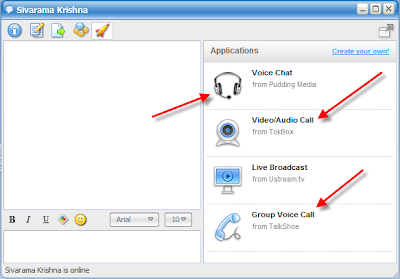
To avail Video and Voice chatting, open a chat window and click on rocket ship icon on the chat tool bar. The window expands and show different options to start Voice and Video chatting conversations.

Sandy, a Meebo blogger, says...

We're super excited to debut applications inside meebo! Just click on that shiny new rocket ship icon in any IM window and then select which app you want to launch with your buddy. The first type of application we're showcasing? Drumroll please... Voice and video chat :)

Via Meebo blog

Sunday, October 21, 2007

Access Blocked Orkut at Office/School/University

There are different ways to access your favorite sites which are blocked at your office/school/university. In our previous post we explained you 4 easy and simple tricks to access blocked web sites. In this post we explain you the different tricks to access blocked Orkut web site.

Trick 1. Using PowerScrap.com

Using PowerScrap web site to access Orkut is the one of the easiest and most reliable way to unblock Orkut. PowerScrap is a safe, fast, reliable and very powerful site to interact with your friends in Orkut.

Trick 2. Using images.orkut.com

In most of the organizations access to images.orkut.com is not blocked. If your organization has not blocked this site then you are very luck. Accessing orkut through images.orkut.com is same as accessing orkut directly.

Trick 3. Using Facebook web site

If you have Facebook account  then you can use My Orkut application of Facebook to get access to Orkut.

Installing and configuring My Orkut Application on facebook web site is very easy by following these simple steps

  1. Click here to install My Orkut Application
  2. Then copy and paste full url of your orkut account in the preference page of My Orkut Application . URL of your orkut account looks similar to

    http://www.orkut.com/Profile.aspx?uid=1820189889131874780. You can get to the URL by clicking on your own Photo after signing in to Orkut.

  3. That's all. Now you can access your Orkut through Facebook.

(it is very unlikely that facebook in banned in most of organizations in India/Asia)

I hope at least one among the above three tricks works at your organization/school/university. Happy Orkuting!!

Bonus Tip - Download free Norton Anti-Virus from Google

Do you know that the world class Anti-Virus program Norton Internet Security 2007 is free with Google Pack? Google is distributing free Norton Anti-virus software for all the users to ensure safer browsing. Download it right now and keep your computer safe.

Tuesday, October 09, 2007

Cool Software:Digg Clone from Intel

image

Intel has joined the social voting space with CoolSW, a Digg clone for “Cool Software.”

The site is said to focus solely on business ideas, and is designed to tap into the opinions of the wider developer and entrepreneur community.

According to a report at Venture Beat, the site cost around $40,000 to develop and has been tested internally, with Intel soliciting views from its employees about the hottest software companies.

image

This site’s been in use internally at Intel for some time, and they are expanding it externally to get more input. While this shows that they have already found it to be successful, they are likely to start seeing spam stories, as well as people posting stories from their own blogs.

Lets hope they can keep the spam and off-topic posts under control along with unique & special features to differentiate from one of those many bookmarking services.

Saturday, October 06, 2007

Extra Large Images Option on Google Images

Google Images has a new search option to find huge images only. Besides the known sizes, Small, Medium and Large now there is an Extra Large option too.The extra large images are several thousand pixels each dimension.

For instance, querying for the keyword "google" with this option found a Google logo with the dimensions 3600*1500 pixels. Note that in combination with image sizes, you can restrict your Google Image searches to a specific domain as usual by using the site operator, like site:flickr.com house.

As images continue to improve with the advances in digital photography,it is not a surprise to see Google to make this move.


Thursday, September 27, 2007

Customize Your Email Address Completely for Your Live Hotmail ids

Microsoft recently unveiled its personalized email service in India, CoolHotmail.com, where users can get to chose unique customized Live Hotmail id’s from a list of over 130 names/domains.

Instead of the default @hotmail.com or @live.com address, you can now opt for other email address choices that relate more closely with your personality, interests or lifestyle.

The service also provides storage facility of five MB as well colour-coded mails for spams and viruses. Microsoft had earlier brought in customised domains Lokhandwalarocks.com in May.

Here is huge list to choose from based on different traits. Like starting with fans of movies, you can have email address on IDs like: clubabhishek.com, clubasin.com, clubkareena.com and many more.

Based on the city you live in options are: mumbairocks.in, goarocks.com, delhi4u.in and many more. There are more options based on your personality like: iamcrazy.in, iamhot.in, lover4life.co.in and many more.

You can use the same custom Hotmail email id to also sign on Windows Live Messenger and Windows Live Spaces. 

In case domain/name you were looking for is not available there, then request here. Microsoft is listening!

Tuesday, September 18, 2007

Watch Never Ending Stream of Amazing Pictures Uploaded by Bloggers

Google Blogger launched Blogger Play, a never ending slideshow of amazing pictures recently uploaded to Blogger blogs. Blogger Play fetches images available in posts of public blogs listed on the web and showcases them in a beautiful way.

Once you start the slide slow you will never feel like stopping it. You will enjoy great snapshots of what people are thinking and posting about right now on Blogger hosted blogs.Along with the picture you can even read a short excerpt of the accompanying blog post and the profile of the blogger.

The pictures displayed in the slideshow are appropriate to all age groups as Blogger Play uses Google SafeSearch algorithm to filter out inappropriate images. If you ask me this is an excellent entertainer and many people are going to be addictive.

Blogger Play can download as much as 200 MB to run an hour long slideshow. If you are using limited broadband connectivity plans you should have an eye on broadband usage meter.

More information for Blogspot Bloggers

By default Blogger Play shows images of all the public listed Blogspot blogs. If you wan to opt-out you can remove your blog from the Blogger’s public blog listing.

Monday, September 10, 2007

Screenshot of Adobe Photoshop Express - Web Based Photoshop

psx_screenshot

Existing online photo editors may soon find the going very tough as Adobe is all set to introduce a very cool online version of Adobe Photoshop (called Photoshop Express) that's free and requires just a web browser with the Flash plug-in.

It's a new member of the Photoshop family that's meant to make Adobe imaging technology immediately accessible way to large numbers of people.

Adobe Sr. VP John Loicono showed that it was possible to adjust an image just by rolling over the different versions shown at the top, previewing the results & then clicking the desired degree of modification.

Wednesday, August 29, 2007

Watch Deleted Youtube Videos With Delutube

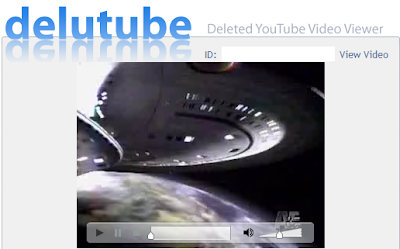
It disappoints a lot whenever we see the message “This video is no longer available” while trying to play a Youtube video. Youtube deletes videos which are linked to copyright issues, adult content and offensive content. But there is a way to watch deleted videos with the help of Delutube.

It is possible to watch deleted Youtube videos with Delutube as long as Youtube maintains a copy of the video on their cache servers. To view the deleted video, just supply the Youtube video id and Delutube will fetch and play it.

How to find Youtube video id?

A set of characters which we see after http://youtube.com/watch?v= in the Youtube URL is the video id. For example lSHCxNmOwfY is the id of youtube video URL http://youtube.com/watch?v=lSHCxNmOwfY.

Delutube may not be able to play videos that have been permanently deleted from the Youtube servers.

» Delutube Website

Wednesday, August 22, 2007

Easily Embed Your Favorite Google Map In Any Webpage

Embedding Google Map in your website with the help of WikiMapia is very easy.

Google Map view of Taj Mahal

Four simple steps to embed a Google Map in your page are

  1. Browse WikiMapia.org site and locate your favorite location in Google Maps
  2. Click on WikiMapia menu available on the right side top corner and select map on your page link
  3. Resize the frame you see on the screen to desired view and copy the html code
  4. Paste the html code on your webpage.

Try embedding your favorite Google Map location on your blog post/webpage and share your URL with us.

Monday, August 20, 2007

Easy Way To Download YouTube Videos In Various Formats Like MP3, 3GP, MPEG, WMV, etc.

We all know that there are so many sites available for downloading our favorite YouTube/Google Videos. But the problem lies in the format of the video; we have to convert the .flv format video to some other format like wmv,3gp,mp4 using a converter tool.

vConvert.net has actually solved this problem, the site takes in a video URL from the user and asks to select the format in which the output file is desired. The site then automatically downloads it to a server, convert it to your chosen format and then provide a link to download the finished product.

With this robust vConvert service we can easily  grab videos from YouTube and convert them into compatible formats for iPod/iPhone, mobile phone, PSP, and more. Even if we only want the audio from a video, vConvert can convert just the audio to an MP3.The best part is it takes only  a minute or two for processing.So get ready to leech away all your favorite music videos on YouTube!